

Search & AI Visibility
AI search quick wins: What to fix on your website first
| Where to start with AI search · Part of a five-part series
It usually starts with a call. The CEO has asked ChatGPT about your category, your brand didn’t come up, and the next morning someone in marketing is asked to explain why. This five-part series is designed to help you avoid that awkward conversation, or know exactly what to say when it happens. Each article answers one of the questions we hear most from teams in financial services, insurance, super and health, and each stands on its own, so start with whichever is most pressing for you. Heads of marketing, brand, digital, growth and content… These articles are for you. Please note “AI search”, “AI search optimisation”, “AI visibility”, “generative engine optimisation (GEO)” and “answer engine optimisation (AEO)” are used interchangeably. They each have their nuances, but all describe the same goal. We mostly use “AI search”. More in this series: Getting setup | Ownership | The business case | Getting cited |
Feeling overwhelmed about AI search and unsure where to begin? Start with an audit, not a fix list. Pick one priority product, save what AI says about it today, then check what your website and documents say. Most organisations find that some of this information is wrong, outdated or conflicting, and AI repeats those mistakes.
Fix your facts first, then build each page around the questions customers arrive with. Put the answers first and ask your tech team to make sure AI can read your pages. None of this needs a big budget, just the right people in the room.
In this article
- Why isn’t our content showing up in AI search?
- Before you start: two common AI search mistakes to avoid
- Not sure where to start? Try a 7-step AI visibility audit
- Quick wins in your control: AI search content fixes
- How to get compliance sign-off faster
- Your AI search quick wins checklist
- How to benchmark your AI search quick wins
- Bonus: Four technical fixes to pass onto your tech team
- Frequently asked questions about AI search quick wins
Why isn’t our content showing up in AI search?
It’s one of the most common calls we hear about. The CEO asks ChatGPT about your category, your brand doesn’t come up, and suddenly marketing and digital are scrambling to fix it.
Usually, it’s not because your team has done a bad job. It’s because AI reads your website differently from the way people do.
- How people read a page: We take in a page visually: we judge credibility from the design and can hunt down a fact even when it’s tucked somewhere odd.
- How AI reads a page: AI systems rely on what they can retrieve and interpret, so buried answers, content hidden behind scripts and conflicting information can make that harder.
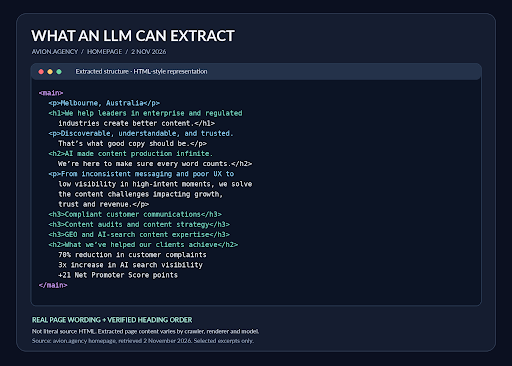
How an AI system might read the Avion homepage: headings and text in order, with none of the design. Real wording and heading order; what’s extracted varies by crawler and model.
There’s good news and not-so-good news.
- The good news is that fixes can work fast. Climbing Google’s rankings can take weeks or months, but we’ve seen clients show up for specific prompts within 24 hours of a change, although it varies by platform.
- The not-so-good news is that the bigger the organisation, the harder it is to get there, because your content has to serve many audiences, stakeholders and compliance requirements at once.
You don’t need to rebuild your site, publish more content or fire your SEO team. The quick wins below focus on making what you already have clearer, more consistent and easier for machines to read.
Before you start: two common AI search mistakes to avoid
One of the most compelling questions I’ve been asked recently came from a Head of Marketing at a national insurance brand: “What’s a mistake you made, and what pitfalls are there to avoid?”
Mistake 1) Fixing before you agree what’s true
Once you know what to change, things can move fast. But in enterprise, the biggest hold-up usually isn’t the change itself. It’s discovering how much of your own information is wrong or contradictory. A fee is updated on the product page but not in the PDF. The help centre describes an eligibility rule one way and an old media release another. A comparison site still lists a product you renamed two years ago. I recently looked at a national insurer’s contact page that said the helpline was open 9am to 5pm, while the FAQ directly underneath said 8am to 6pm.
When that happens, AI either repeats the wrong fact or can’t work out what’s right and cites no one at all. And the results you promised the CEO within weeks blow out to months, because everyone is still arguing about what’s accurate.
Mistake 2) Trying to fix everything at once
AI answers informational questions most often, which is why help and support content is often the most cited part of a website. But leadership teams usually care about growth, and ‘help’ content rarely wins a new customer. Comparison is where revenue is won or lost: among Australians who use AI for money matters, 45% use it to compare financial products, according to AustralianSuper’s 2026 research. So pick the stream that matters most to your organisation right now.
| Protect the brand | Grow revenue | |
|---|---|---|
| The goal | Make sure AI describes you accurately when people ask about you by name | Get recommended when people compare options and haven’t chosen yet |
| Typical trigger | Inaccurate AI answers, complaints, a regulator or executive asking questions | Falling traffic or enquiries, competitors appearing instead of you |
| Prompts to focus on | Branded and validation prompts, such as Is [brand] any good? or What does [brand] charge? | Non-branded definition and comparison prompts, such as Which super fund suits a 35-year-old? |
| Content to fix first | Core product facts, About and company pages, help content, and your profiles on review and comparison sites | Educational and comparison content for your most profitable product: how it works, who it suits, what it costs and how it compares |
Many organisations need both eventually, but starting with one makes the first 60 days far easier to plan and report on. Either way, the audit comes first, and your choice tells you which prompts and pages to look at closely.
Not sure where to start? Try a 7-step AI visibility audit
An AI search audit can take an afternoon or several months. We know how easily it blows out, so we start small: one product, the questions customers actually ask, and the facts behind them.
Step 1. Pick one product or service that matters to growth
Ideally your most profitable, or the one leadership is most worried about.
Step 2. Talk to the people who hear from customers
Ask your sales, contact centre and complaints teams for the most common queries and complaints about that product. Add whatever feedback you can get easily, such as NPS comments, Google reviews and the 30 most recent reviews on ProductReview.com.au.
Step 3. List the 20 facts customers ask about most
Usually fees, rates, eligibility, what’s covered, waiting periods, opening hours, and how to apply, claim or cancel. Cover three kinds of questions:
- what something is
- how it compares with the alternatives, and
- whether it’s the right choice.
Step 4. Decide what’s true, then find everywhere it’s published
Confirm each fact with product and compliance, then hunt down every place it appears: old product and campaign pages, PDFs, app store listings and comparison site profiles. Search your site and Google (for example, site:yourdomain.com.au “waiting period”), and check the sources AI cites, which often point to pages you’d forgotten existed.
Step 5. Check what AI tells customers today
Do this before you change anything. Put your questions to ChatGPT, Google’s AI Mode and the other engines your customers use, and save each answer with the question, engine and date. Record what’s wrong, how serious it is, whether it comes from your content or a third party, and who appears instead. This is what you’ll measure your quick wins against, and it’s the evidence that gets leadership’s attention.
Step 6. Log every conflict, with an owner
Product and compliance confirm the right answer, content fixes the wording, and web or SEO retires or redirects old pages. Keep a change log of what changed, where and when. Your CMS may already keep version history, but a spreadsheet does the job for a one-product pilot.
Step 7. Find the fixes that can scale
Many large sites, especially those on a headless or component-based CMS, publish one block of content, such as a fee table or contact details, across many pages. That cuts both ways. One fix can update every page at once, which makes these blocks your fastest wins. Just be warned that this also means one error can spread just as far. If someone updates something in the block, every other place this information is referenced also needs updating. That’s how a contact page ends up with two sets of opening hours.
Why start small with an AI visibility audit?
Starting small has benefits beyond AI search. By focusing on one high-value area, you can resolve the inconsistencies that have quietly been chipping away at customer confidence, strengthen your SEO foundations and build a measurable case for investing in GEO. It’s a manageable place to start, with the potential to prove the value of better content well beyond AI search.
Quick wins in your control: AI search content fixes
These are the fixes marketing, brand, digital and content teams can lead themselves, with product and compliance helping to confirm the facts.
Fix conflicting facts, and stop them coming back
Correct or retire every conflicting fact your audit found, merge duplicate pages, and agree one source of truth for each key fact, with an owner and a review date. Without that, the inconsistencies creep back within months.
Customers are checking, too. In WPP Media’s 2026 research, two-thirds of Australians who use AI to help make purchase decisions had asked it whether a brand’s advertising claim was true. In regulated industries, an inconsistent claim is also a compliance risk.
Build each page around the questions behind one decision
It’s tempting to treat a website like a print catalogue. But people arrive at a page with a cluster of questions about one decision: is this right for me, what does it cost, what’s covered, how do I get a quote? AI matches each question to the page that answers it most clearly.
That doesn’t mean one page per question. An income protection page can answer a dozen related questions, as long as they belong to the same decision. Give each one a descriptive subheading in the customer’s words, so AI can lift the answers one at a time. What muddies a page is mixing decisions: a promo banner competing with the headline, calls to action pointing different ways, or cross-sell for another product halfway down.
Lead with the answer people came for
What goes at the top depends on the question someone has before they land. On your homepage or About page, it’s usually what you do and who you do it for. On a product page, it’s what the product is, the key facts and who it suits, followed by cost, trade-offs and how to apply. Under every subheading, answer the question in the first sentence or two, in the customer’s words. If a section is headed with a clever campaign line, AI has to guess what it’s about, and so do your customers.
That doesn’t mean losing your brand voice. Keep headings and first sentences plain, then let your voice come through in the examples you choose, how you explain trade-offs and the reassurance you give when the honest answer is “it depends”. What doesn’t survive is the scene-setting paragraph that delays the answer.
Here’s an example for one of the questions on an income protection page:
How long is the waiting period?
Instead of this:
At [your company], we understand that life can change in an instant. That’s why our flexible income protection cover is designed to give you peace of mind when you need it most. Waiting periods may vary depending on the options you choose and your individual circumstances. Please refer to the PDS for full details.
Try this:
You can choose a waiting period of 30, 60 or 90 days when you apply. This is how long you wait after you stop working before your payments start. A shorter waiting period means payments start sooner, but your premium will be higher.
The first version never answers the question. The second answers it in the first sentence, explains it in the second and gives the trade-off in the third, so the details from the PDS can follow underneath.
Make every section easy for AI to lift
AI pulls answers out of pages in chunks, so each chunk has to stand on its own. Use descriptive subheadings, short paragraphs, tables for numbers and comparisons, and a summary of the key facts near the top.
| Try the lift test
Copy the first two sentences under each heading and read them on their own, as if they were quoted in an AI answer. If they still make sense and answer the heading’s question, the section is easy to lift. If they rely on what came before (“as mentioned above”, “this option”, “it”), or only make sense with a brand introduction, rewrite them. |
Don’t leave key facts only in PDFs
It’s a myth that AI can’t read PDFs. It can, we’ve seen it cite product disclosure statements. But the problem is that PDFs are long-form, so the answer to a customer’s question sits deep in dense paragraphs rather than in chunks AI can lift. Superseded versions can also continue being cited long after the web page is updated.
Keep the PDF, because compliance usually requires it, but publish a plain-language summary of the key facts as page text and link to the PDF as the authoritative document.
Show who wrote and reviewed each page
Add a named author or subject-matter expert, a reviewer where relevant (often a clinician, actuary or compliance reviewer), and a last-reviewed date. AI systems and the people reading their answers both look for evidence that a page is current and accountable.
A small change to a page’s metadata and byline can make a big difference to how accountable it looks. Here’s an illustrative example for a home insurance page.
| Instead of this | Try this | |
|---|---|---|
| Meta description | Protect your home with flexible cover options and great value insurance. | Factual guidance on home insurance cover and claims, reviewed by our product and compliance teams. |
| Author | [Brand] | [Brand] Home Insurance Product Team |
| Dates | Published: 2025 | Published: 18 June 2025. Reviewed and updated: 3 February 2026. |
How to get compliance sign-off faster
In regulated industries, quick content wins usually stall in approvals rather than writing. Three things help:
- Bring compliance into the audit, so they help agree the source of truth rather than review it after the fact.
- Agree pre-approved wording for your key facts. Once the 20 facts that matter most have approved wording, the same sentence can be reused across pages without a fresh review each time.
- Show the compliance team what AI is currently saying. Inaccurate AI answers about your fees, eligibility or exclusions are a risk they’ll want fixed too, which makes them an ally rather than a gate.
Your AI search quick wins checklist
In your control
- Run a content audit and save your AI benchmark
- Fix conflicting facts
- Build pages around one decision
- Lead with the answer
- Make sections easy to lift
- Put key facts in page text, not just PDFs
- Add authors and review dates
Raise with your tech team
- Fix broken links, redirects and duplicate pages
- Keep structured data accurate
- Check AI crawlers can read your pages
- Make sure you aren’t blocking AI search bots
A 30-day plan for one pilot
Week 1: benchmark. Pick your goal and one product, and save what AI says about it today. |
How to benchmark your AI search quick wins
Benchmark before you change anything. The answers you saved in step 5 of the audit are your starting point. Four to six weeks after your fixes go live, ask the same questions in the same way and compare. Look for fewer inaccurate answers, more mentions or citations, and your own pages appearing as sources where third parties used to. Your change log tells you which fixes went live when.
AI answers vary from run to run, so look for a pattern across several questions rather than reading too much into one result. To track progress over time without checking by hand, an AI visibility platform automates the work; Getting set up, also in this series, covers how to choose one.
| Where Avion fits
Avion is a content consultancy helping organisations identify barriers to AI discoverability, prioritise improvements and measure their impact. We audit content, identify technical issues affecting visibility and recommend what to fix. We work alongside SEO and development partners who manage technical implementation, while we focus on making content clearer, more useful and easier for AI to find and understand. The goal is to prioritise a high-value opportunity, demonstrate the impact of better content and build an evidence-based case for further GEO investment. |
Bonus: Four technical fixes to pass on to your tech team
These fixes sit with your web, development and SEO teams or partners. You don’t need to make them yourself, but you do need to know what to ask for, how to check where you stand and what to expect.
1) Fix broken links, redirects and duplicate pages
This is the easiest technical quick win. Research from Vercel and MERJ found ChatGPT’s and Claude’s crawlers spent around a third of their fetches on pages that returned errors, and old pages that are still live keep feeding AI out-of-date facts.
- How to check. Run a crawl with a tool such as Screaming Frog, which is what we use. It’s free for up to 500 URLs and £199 a year beyond that, at the time of writing. Or ask your website manager to export a list of every page from your CMS.
- What to expect. An enterprise site will produce thousands of URLs, because every image, video and PDF gets one too. Filter to HTML pages only, then to those that return an error (404), redirect (301) or duplicate another page, and fix those first.
- What fixing looks like. Remove dead pages properly so they can’t be indexed, rather than just taking them out of the navigation. Where a page has moved, redirect it to the most relevant live page, not the homepage.
2) Keep your structured data accurate
Structured data tells machines what a page is and who published it. It’s useful, but don’t expect it to do the heavy lifting: AI quotes the visible content on the page, not the code behind it.
| What is structured data (or schema)?
Structured data is a small piece of code added behind a web page that labels what’s on it, in a standard format search engines and AI systems understand. It’s often called schema, after schema.org, the shared vocabulary most websites use. Your customers never see it. Where to find the full list: Schema.org lists every type and property, and it’s the same standard whichever CMS or DXP you use. For a shorter list, Google’s Search Central documentation covers the types Google supports. |
3) Check that AI crawlers can read your pages
This is the fix that surprises people most. When it comes up with marketing leaders, the reaction is almost always: “I had no idea. I need to talk to my team about that.”
At the time of writing (November 2026), the crawlers OpenAI, Anthropic and Perplexity use to fetch pages don’t run JavaScript, the code behind features like rate calculators, eligibility checkers and tabs that open on click. On some sites, the words themselves only appear once that code runs, so these crawlers see a blank or half-empty page. Google’s AI features are the exception. It’s the fix that surprises marketing leaders most, and in regulated industries it often hides the content customers care about: rates, fees and eligibility rules.
- How to check. Open a priority page in Chrome, turn JavaScript off (Settings, then Privacy and security, then Site settings, then JavaScript) and reload. Whatever disappears is what most AI crawlers can’t see. If you appear in Google’s AI Overviews but not in ChatGPT or Claude, check this first.
- What to expect. The usual fix is server-side rendering, which puts the words on the page before any code runs. It rarely means a rebuild, and nothing changes for customers or your design team: calculators and tabs still work.
4) Make sure you aren’t blocking AI search bots
Many organisations blocked AI crawlers in 2023 and 2024 over training data concerns, and some of those rules now also block the bots that fetch pages to answer questions and cite sources. Some CDNs and security tools now block AI crawlers by default, so you may be blocking them without anyone having decided to.
- How to check. Type yourdomain.com.au/robots.txt into a browser and look for names such as GPTBot, OAI-SearchBot, ClaudeBot, Claude-SearchBot and PerplexityBot next to the word Disallow. Blocks in your CDN or firewall won’t show up there, so ask your web or security team to confirm those too.
- What to expect. The change takes minutes; agreement takes longer. Ask your web, security and legal teams to decide together, bot by bot, rather than with a blanket rule. If you get pushback, it usually comes down to three concerns, and each has an answer. Most AI companies run separate bots for training and search, so you can block training and still allow search. OpenAI, Anthropic and Perplexity publish their bots’ IP addresses, so your security team can tell real bots from fakes. And rate limiting controls how often bots visit without shutting them out.
Frequently asked questions about AI search quick wins
What’s the difference between FAQ schema and FAQ rich results?
FAQ schema is code behind a page that labels its questions and answers for machines. FAQ rich results were what Google sometimes showed because of that code: an expandable list of questions under your link in search results. Google stopped showing them in May 2026, but the schema itself is still valid.
Should we remove our FAQ schema now Google has stopped showing FAQ rich results?
There’s no need. It does no harm, and Google and other systems may still use it to understand your page. Just don’t rely on it as a way to get cited; the visible answer on the page matters far more.
Will these changes hurt our Google rankings?
No. Readable pages, clear structure and clean redirects are long-standing SEO good practices, and your SEO team will most likely welcome the support.
Related reading: Why AI systems often struggle to interpret large websites

About the author
Natalie is a content strategist and co-founder of Avion, helping organisations shape clear, consistent brand narratives in an AI-driven world.
Recent articles

The hidden costs of death by committee
Too many voices and no clear message. Stop content dilution before it costs your brand.
Are your brand guidelines AI-ready?
Your brand guidelines might work for your team. But will they work for AI? Here’s how to close the gap.

No internet. No ChatGPT. Now everything is different – except healthcare content
AI is changing how patients search for health information. Here’s why healthcare content needs to become more specific and patient-focused.

Our hot takes, straight to your inbox
Subscribe and join hundreds of readers just like you.